I vividly remember the day my productivity system collapsed. I was managing three freelance clients, planning a home renovation, and trying to learn a new programming framework. My desk was covered in sticky notes. My digital calendar was a mess of color-coded blocks. And my to-do list? It was a scrolling nightmare of 45 items, all screaming for attention.
I felt busy every single minute of the day. Yet, at 5:00 PM, I would look at my list and realize I hadn't actually finished anything important. I had started ten things and completed zero.
I was suffering from "open loop" anxiety. My brain was trying to hold onto every task simultaneously, and it was exhausting.
That is when a senior project manager introduced me to Kanban. I initially thought it was just for software teams or car factories. I didn't realize it could be applied to my personal life.
Within a week of using it, the noise in my head quieted down. I wasn't doing more work, but I was finishing more.
If you feel like you are constantly juggling balls and dropping half of them, this guide is for you. Let’s walk through how to visualize your work and regain control using the Personal Kanban method.
What Is Personal Kanban?
The word "Kanban" is Japanese for "signboard" or "billboard." It was developed by Toyota in the 1940s to improve manufacturing efficiency. They used physical cards to signal when parts were needed, ensuring they never had too much inventory or too little.
In the context of personal productivity, Kanban is a visual system for managing your work as it moves through a process.
Most to-do lists are linear. They are just a list of things you need to do, often buried in a notebook. You can't see the flow. You can't see the bottlenecks.
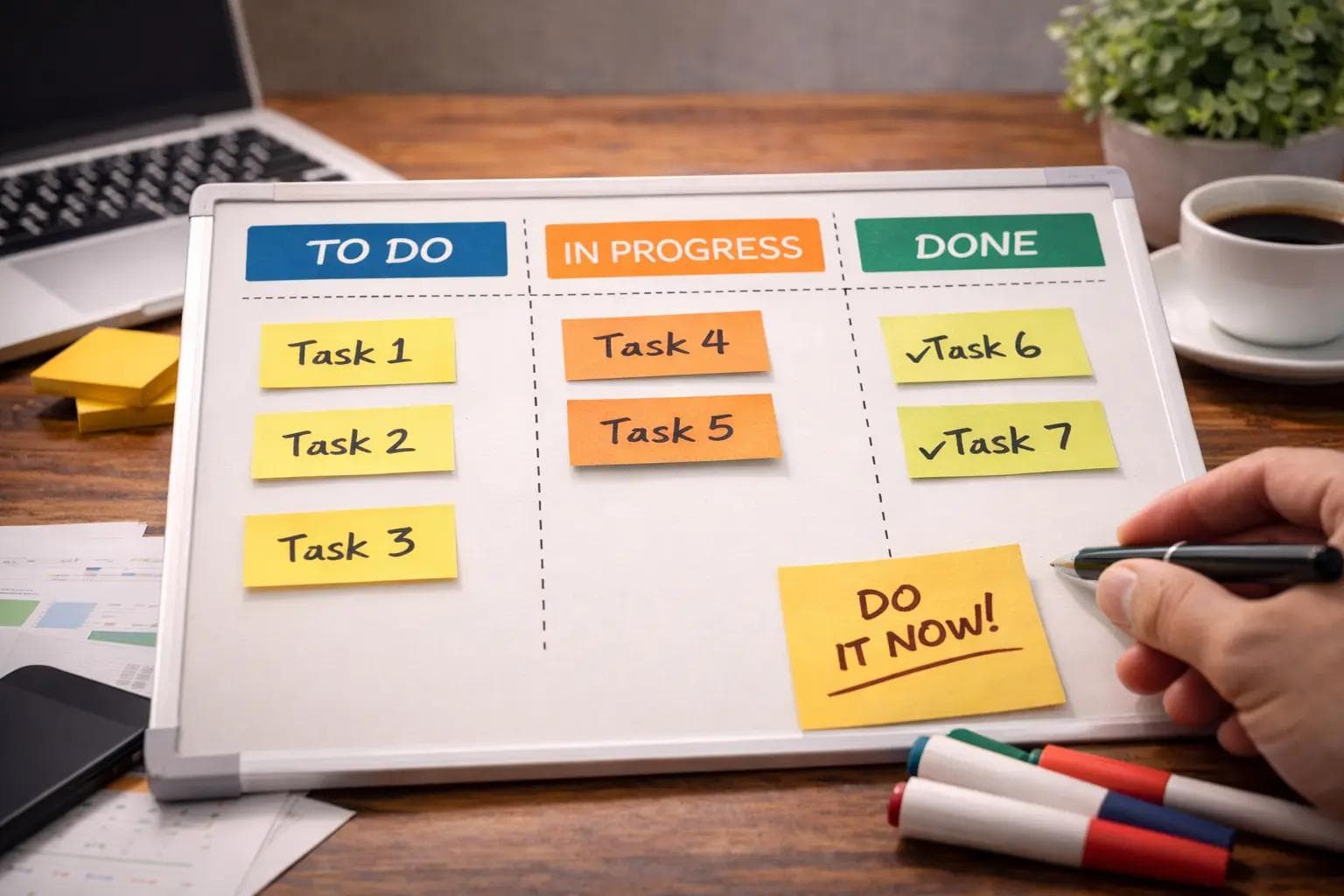
Kanban changes this by visualizing your work on a board with columns. The simplest version has three columns:
- To Do (The backlog of tasks waiting for you)
- Doing (The tasks you are currently working on)
- Done (The tasks you have finished)
Instead of crossing items off a list, you physically move a card (a sticky note or a digital ticket) from left to right. This simple act of movement gives your brain a dopamine hit and a clear sense of progress.
The Two Golden Rules of Kanban
You might think, "Okay, it's just a board." But the magic isn't in the board; it's in the rules that govern it. Personal Kanban relies on two fundamental principles.
Rule 1: Visualize Your Work
You cannot manage what you cannot see. When your tasks are hidden in emails, Slack messages, and mental notes, they are invisible threats.
By writing every single task on a card and putting it on the board, you make the work tangible. You can physically see that you have 15 things in your "To Do" column. This forces you to confront reality. You can't pretend you have free time when the board is full.
Rule 2: Limit Your Work in Progress (WIP)
This is the game-changer. This is where most people fail.
We are terrible at multitasking. When we try to do three things at once, we do all of them poorly. Kanban forces you to set a WIP Limit.
For example, you might set a limit of 2 for your "Doing" column. This means you are strictly forbidden from pulling a third task into the "Doing" column until you finish one of the current two.
If your boss asks you to do something urgent, and your "Doing" column is full, you have to say: "I can do that, but I need to finish this report first to clear a slot."
Setting Up Your First Personal Kanban
Let’s get practical. You don't need expensive software. You can start with a whiteboard and sticky notes, or a window and dry-erase markers.
Step 1: The Backlog (To Do)
Dump everything out of your brain. Write every task on a separate sticky note. "Buy milk," "Email client," "Fix bug," "Call Mom." Put them all in the first column.
Step 2: The Selection
Look at your backlog. Which items are crucial for today? Move those specific sticky notes to a "Today" or "Ready" column. This acts as a filter so you aren't staring at 50 tasks all day.
Step 3: The Execution (Doing)
Pull one task into the "Doing" column. Just one. Focus entirely on that task. When it is done, move it to "Done." Only then can you pull the next one.
When This Method Works Best
In my experience, Kanban shines in specific environments where work flows continuously.
Unpredictable Workflows
If your day is full of surprises—like IT support, customer service, or freelance work—Kanban is better than a rigid schedule. You don't have to re-plan your whole day when an emergency hits; you just add the emergency card to the board and prioritize it.
Visual Learners
If you get overwhelmed by text-heavy lists, Kanban is a relief. You can use color-coded sticky notes (e.g., Blue for personal, Yellow for work, Red for urgent). One glance tells you the "health" of your day.
Teams of One
If you are a solo founder or a student, you are often playing multiple roles (marketer, developer, accountant). Kanban helps you see which role is taking up too much time. If your "Doing" column is full of "accounting" tasks, you know you are neglecting "marketing."
When It Fails or Feels Frustrating
Kanban is powerful, but it is not a silver bullet. I have seen people abandon it for a few reasons.
The "Stale Board" Syndrome
If you don't look at your board every day, it becomes a graveyard of old intentions. A physical board must be in your line of sight. If you use a digital app (like Trello or Notion), you must have it open on a second monitor.
Lack of Deadlines
Kanban focuses on flow, not dates. It tells you what to do next, but it doesn't inherently tell you when it must be done.
My Fix: I write the due date in big red ink on the sticky note itself. If a task has a hard deadline, I place it at the very top of the "To Do" column.
Integrating with Other Productivity Methods
Kanban is rarely used in isolation. It is the "Visual Operating System" that runs other apps.
Kanban + The Eisenhower Matrix
The Eisenhower Matrix helps you decide what goes on the board.
- Quadrant 1 (Urgent/Important) tasks go to the top of the "To Do" column.
- Quadrant 4 (Not Urgent/Not Important) tasks never even get a sticky note.
I use the matrix during my morning coffee to filter my backlog, then I use Kanban to execute the day.
Kanban + The Pomodoro Technique
Pomodoro helps you move the cards. When I pull a card into "Doing," I set a timer for 25 minutes. The physical act of moving the card triggers my brain to start the timer. The card doesn't move to "Done" until the timer rings and the work is complete.
Real-World Workflow: My "Writer’s Board"
To show you this in action, here is the exact column structure I use for my content writing business. A simple "To Do / Doing / Done" wasn't enough for me, so I customized it.
Column 1: Ideas (The Backlog) This is where I dump random thoughts. "Article about AI," "Review of new keyboard," etc.
Column 2: To Write (Ready) Once a week, I pick 3 ideas from the backlog and move them here. These are my commitments for the week.
Column 3: Researching (Doing Phase 1) I am gathering facts. Limit: 2 tasks.
Column 4: Writing (Doing Phase 2) I am actually typing the draft. Limit: 1 task. Note: This limit is crucial. I cannot write two articles at once.
Column 5: Waiting (The Holding Pen) This is for tasks blocked by others. "Sent to editor," "Waiting for client feedback." This prevents my "Doing" column from getting clogged with things I can't control.
Column 6: Published (Done) The trophy case. Seeing this fill up gives me immense satisfaction.
Common Mistakes Beginners Make
I have made these errors, and I see my students make them constantly.
1. Treating the "Backlog" as a Trash Can
If you put every single thought on the board, it becomes cluttered and overwhelming. The Fix: Be ruthless. Only put tasks on the board that you actually intend to do soon. Keep a separate "Someday/Maybe" list in a notebook for vague ideas.
2. Ignoring WIP Limits
This is the most common failure. You have five things in "Doing." You are cheating. The Fix: If you find yourself pulling a third task into "Doing," stop. Force yourself to move one of the other two back to "To Do" or finish it. The limit is painful on purpose; it forces prioritization.
3. Making Cards Too Vague
You write "Project X" on a card. That is too big. You can't "do" a project in one sitting. The Fix: Break it down. Instead of "Project X," write "Draft Outline for Project X" or "Email Team about Project X." Each card should represent a concrete action that takes less than 2 hours.
Digital vs. Analog Boards
Should you use software or a physical wall?
The Physical Board (Whiteboard/Wall):
- Pros: It is always visible. You get the tactile satisfaction of moving paper. No internet required.
- Cons: You can't access it from the coffee shop. It doesn't have search functionality.
The Digital Board (Trello/Jira/Notion):
- Pros: searchable, portable, allows attachments and links.
- Cons: Out of sight, out of mind. It’s easy to ignore a browser tab.
My Recommendation: Start physical. Use a section of your wall or a piece of cardboard. The physical act of writing and moving helps wire the process into your brain. Once you have the habit (after about 3 weeks), move to a digital tool like Trello.
FAQ Section
What do I do with "Waiting" tasks?
Create a dedicated column called "Pending" or "Waiting On." If you send an email and are waiting for a reply, move the card there. Review this column every morning to send follow-up emails.
How do I handle recurring tasks?
For daily tasks like "Check Email," I don't use a card. That's a habit. I use cards for project work. However, for weekly tasks like "Weekly Review," I have a permanent card that I move to "Done" on Friday and move back to "To Do" on Monday.
Can I share a board with my family?
Yes! "Family Kanban" is a real thing. Put a board on the fridge. Columns: "To Do," "Doing," "Done." Cards: "Wash Dishes," "Walk Dog," "Pay Bills." It stops the nagging because everyone can see who is doing what.
Conclusion: Stop Starting, Start Finishing
The mantra of Kanban is simple: "Stop Starting, Start Finishing."
We are addicted to starting things. Starting feels like progress. But starting isn't the goal; value is only created when something is finished.
The Kanban board is a mirror. If you look at it and see a jam in the "Doing" column, it is telling you that you are distracted. If you see nothing in the "Done" column, it is telling you that you are stuck.
It removes the emotion from productivity. You don't have to feel guilty about what you aren't doing. You just look at the board, see the empty slot in "Doing," and pull the next card.
About the Author

Suraj - Writer Dock
Suraj Kumar is a writer, entrepreneur, and the CEO and founder of this website, sharing simple and practical insights on business, creativity, and personal growth. With experience building digital projects, they enjoy helping others learn, grow, and succeed online.


