
If you are building a web application with Next.js in 2026, you are likely overwhelmed by the acronyms.
You have a simple goal: you want your website to be fast, and you want the data to be correct. But then you’re hit with a decision matrix. Should you use SSR (Server-Side Rendering)? What about SSG (Static Site Generation)? Or the magical ISR (Incremental Static Regeneration)?
Choosing the wrong one isn't just a code preference—it can tank your SEO rankings, frustrate your users with slow loading spinners, or crush your server under heavy traffic.
In this guide, we won’t just define these terms. We will break them down using a single, real-world scenario: building a massive e-commerce store called "TechGear." By seeing how different parts of this store use different rendering strategies, you will understand exactly when and why to use each one.
The Core Dilemma: Speed vs. Freshness
Before we look at the code, we need to understand the trade-off. Every website balances two competing needs:
- Speed (Static): You want to serve pre-built HTML files immediately (like a flyer you printed yesterday). This is fast but might be outdated.
- Freshness (Dynamic): You want to build the page customized for the user right now (like a receipt printed at the register). This is up-to-date but takes time to generate.
Next.js gives you tools to slide this scale back and forth. Let’s see how.
1. Static Site Generation (SSG): The Speed King
SSG is the default for a reason. In this model, Next.js builds your pages once—at "build time" (when you deploy your code).
When a user visits your site, the server doesn't have to do any work. It simply hands over the pre-generated HTML file. It is instantaneous.
How It Works
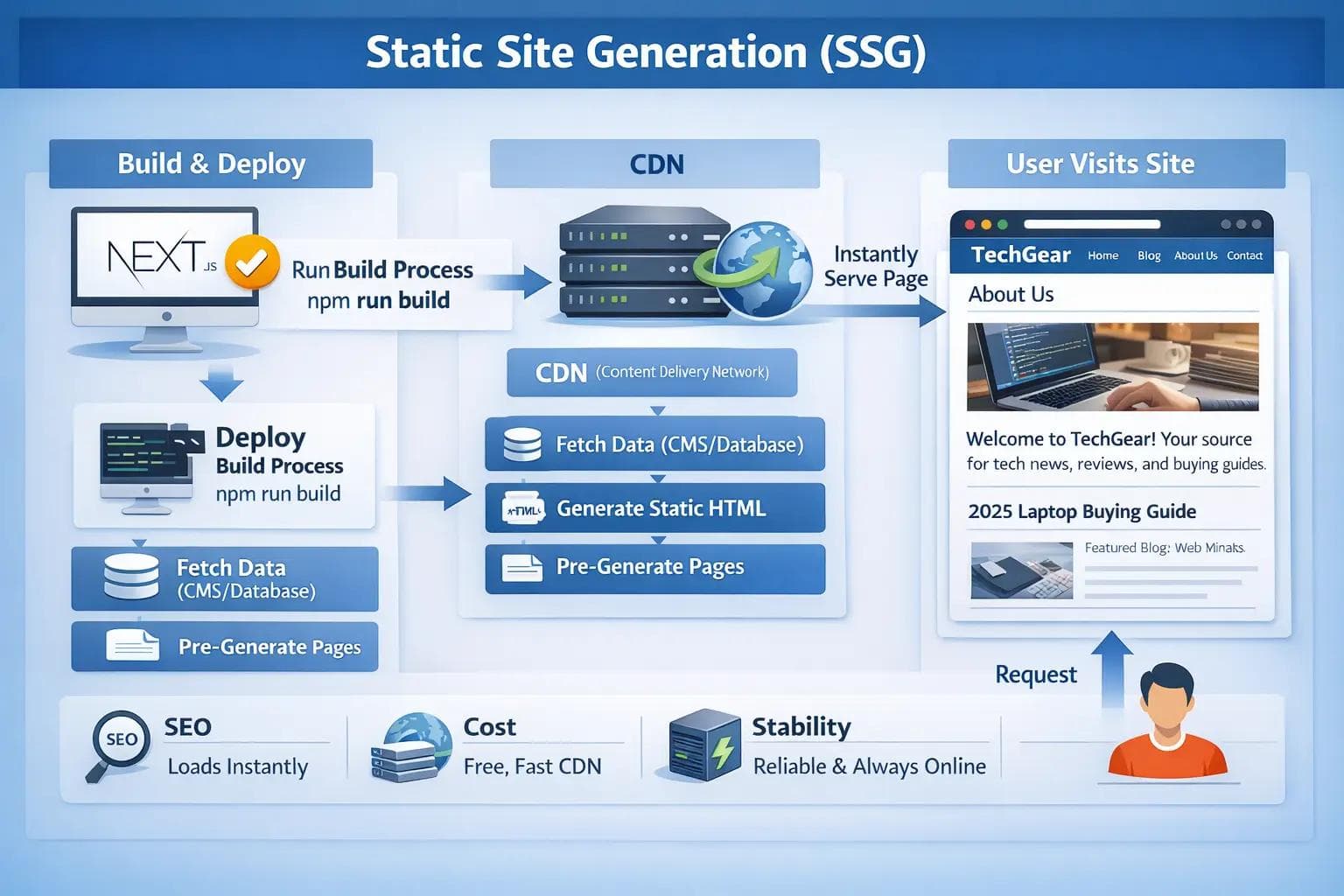
- When it runs: During the build process (e.g., when you run npm run build).
- Data Source: Fetches data from your CMS or database once.
- Performance: 10/10. It’s just serving a file.
Real-World Example: The "TechGear" About Page & Blog
For our imaginary store, think about the "About Us" page or the "2025 Laptop Buying Guide" blog post.
Does the content of your "About Us" page change every minute? No. It changes maybe once a year. Therefore, it makes no sense to ask a database for this content every time a user visits.
Why we use SSG here:
- SEO: Google loves static HTML that loads instantly.
- Cost: You can serve these pages from a CDN (Content Delivery Network) for free.
- Stability: Even if your database goes down, these pages stay up because they are just static files.
Pro Tip: In the Next.js App Router, all components are Server Components by default. If you don't use dynamic functions (like cookies() or headers()), Next.js automatically treats them as SSG.
2. Server-Side Rendering (SSR): The Freshness Expert
On the other end of the spectrum is SSR.
In this model, the page is built on-demand. Every time a user requests the page, the server wakes up, fetches the latest data, generates the HTML, and sends it to the browser.
How It Works
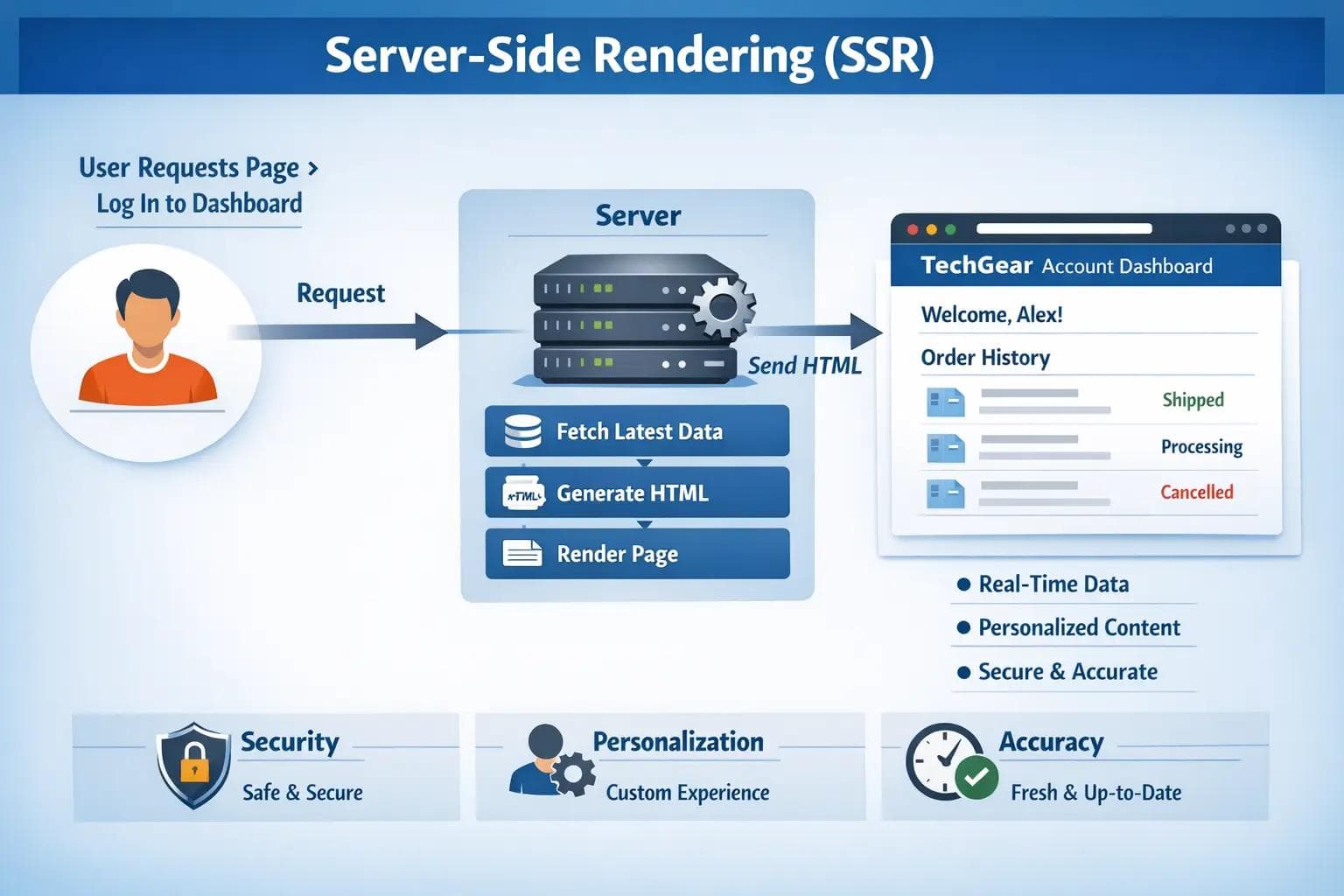
- When it runs: On every single request.
- Data Source: Fetches real-time data from the database.
- Performance: 6/10. The user has to wait for the server to do the work before seeing anything.
Real-World Example: The "TechGear" Account Dashboard
Imagine a user logs into their profile to see their Order History.
You cannot pre-build this page because every user sees something different. You also can't serve a "cached" version from 10 minutes ago, because they might have just cancelled an order. The data must be live.
Why we use SSR here:
- Security: Logic runs on the server, keeping private data safe.
- Personalization: The page is constructed specifically for the user currently logged in.
- Accuracy: There is zero risk of showing stale data.
The Downside: If 1,000 users visit this page at once, your server has to build 1,000 pages simultaneously. This is expensive and harder to scale.
3. Incremental Static Regeneration (ISR): The Best of Both Worlds
Here is the problem: What about the Product Page for a MacBook Pro?
- SSG? No. If you change the price, you don't want to rebuild the entire website just to update one number. Plus, if you have 50,000 products, building them all at once takes hours.
- SSR? No. Product pages get huge traffic. SSR would crash your server during a Black Friday sale.
Enter ISR.
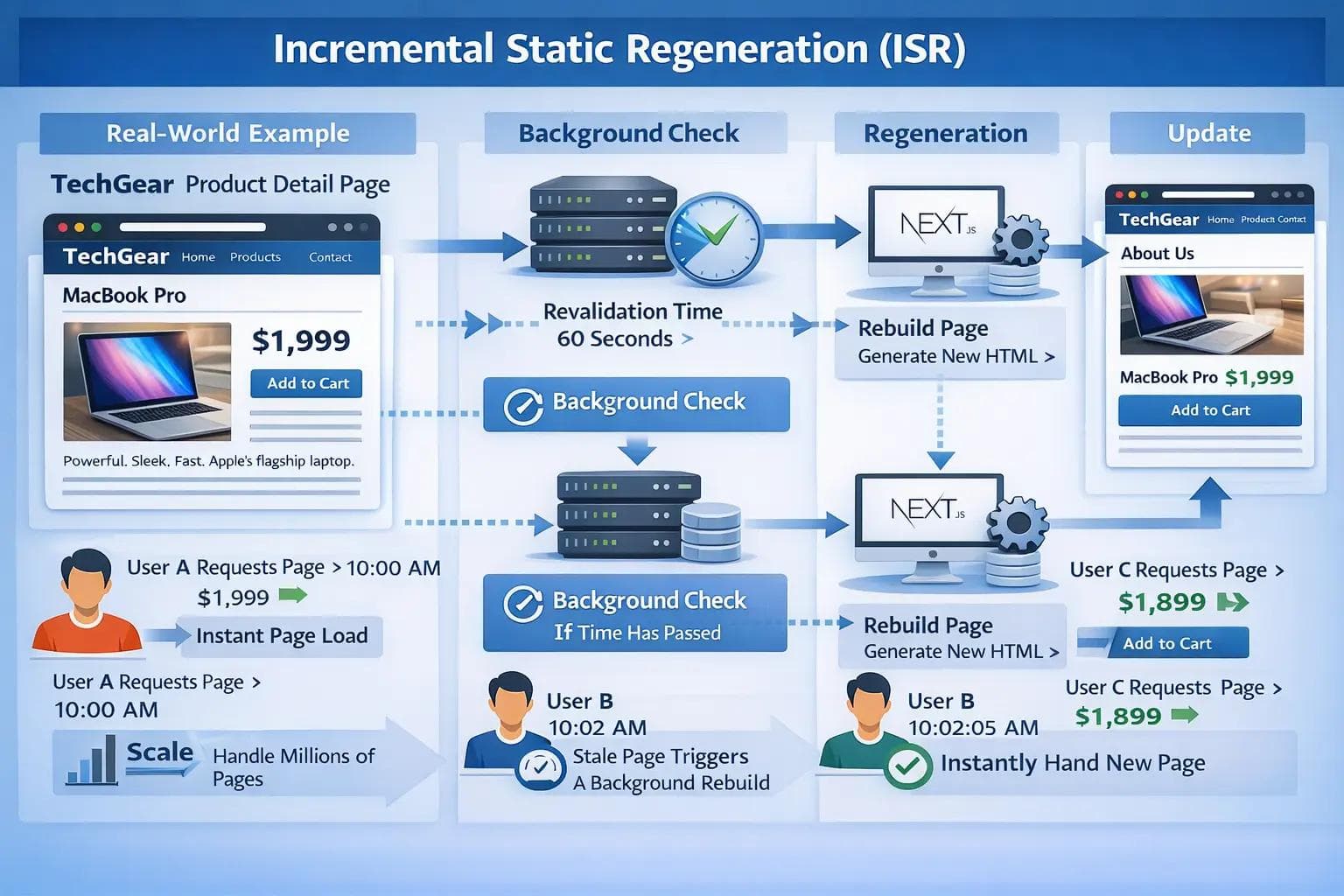
ISR allows you to create static pages (like SSG) but update them in the background as traffic comes in. It’s a "stale-while-revalidate" strategy.
How It Works
- Initial Load: The first user gets a fast, static page (even if it's slightly old).
- Background Check: Next.js checks if the "revalidation time" (e.g., 60 seconds) has passed.
- Regeneration: If time has passed, Next.js rebuilds that specific page in the background.
- Update: The next user gets the brand-new version.
Real-World Example: The "TechGear" Product Detail Page
For our MacBook Pro product page, we set the revalidation time to 60 seconds.
- User A visits at 10:00 AM. They see the price is $1,999. (The page loads instantly from cache).
- You update the price to $1,899 in your database at 10:01 AM.
- User B visits at 10:02 AM. They still see $1,999 (the cached version). However, their visit triggers a background rebuild.
- User C visits at 10:02:05 AM. They see the new price: $1,899.
Why we use ISR here:
- Scale: You can have millions of product pages. Next.js only builds the ones people actually visit.
- Speed: Users get the performance of a static site.
- Freshness: Data is never more than 60 seconds old.
Summary Comparison Table
Here is a quick cheat sheet to help you decide.
| Feature | SSG (Static Site Gen) | SSR (Server-Side Render) | ISR (Incremental Static) |
|---|---|---|---|
| Render Time | Build Time | Request Time | Build Time + Background |
| Speed | ⚡️ Fastest | 🐢 Slowest | ⚡️ Fast |
| Data Freshness | Stale (until deploy) | Live (Real-time) | Periodic (e.g., every 60s) |
| Server Load | Lowest | Highest | Low |
| Best For | Blogs, Marketing, Docs | Dashboards, Social Feeds |
How to Choose? A Decision Framework
Still not sure? Ask yourself these three questions.
1. Is the content specific to the user?
- Yes (e.g., Profile settings, Cart): Use SSR (or Client-Side Rendering). You cannot cache this.
- No (e.g., Blog post, Product): Use SSG or ISR.
2. How often does the data change?
- Rarely (e.g., Privacy Policy): Use SSG.
- Frequently (e.g., Stock prices, Comments): Use SSR or Client-Side Fetching.
- Occasionally (e.g., CMS content, Products): Use ISR.
3. How many pages do you have?
- Small (< 100 pages): SSG is fine. Rebuilding the whole site is fast.
- Huge (> 10,000 pages): Use ISR. You cannot wait 4 hours for a build to finish every time you fix a typo.
Technical Implementation (App Router Update)
If you are using the modern Next.js App Router (Next.js 13/14/15+), the syntax has changed, but the concepts remain the same.
- For SSG: Do nothing. It is the default.
- For SSR: Mark your fetch request as no-store.
1fetch('https://api.example.com/data', { cache: 'no-store' })- For ISR: Add a revalidate tag to your fetch.
1fetch('https://api.example.com/data', { next: { revalidate: 60 } })This simple configuration change is all it takes to switch between these powerful rendering modes.
FAQ
Q: Can I mix these strategies in one app? A: Absolutely. This is the superpower of Next.js. Your home page can be SSG, your product pages ISR, and your checkout page SSR. They coexist perfectly.
Q: Why not just use Client-Side Rendering (CSR) for everything? A: You can, but it hurts SEO. Google bots prefer HTML that is already rendered. CSR (like a standard Create React App) sends an empty page that requires JavaScript to fill in. This is slower for the user and harder for search engines to index.
Q: Does ISR work with a CDN? A: Yes! Vercel (the creators of Next.js) and other hosting providers handle the caching logic automatically at the edge, ensuring global users get the static speed.
Conclusion
Building a high-performance web application is about matching the right tool to the right problem.
- Use SSG for things that never change.
- Use SSR for things that must change right now.
- Use ISR for the massive middle ground—where you need the speed of static HTML but the flexibility of a database-driven site.
By mastering these three acronyms, you stop fighting against your framework and start building sites that feel instant for your users, regardless of how much data you are throwing at them.
About the Author

Suraj - Writer Dock
Suraj Kumar is a writer, entrepreneur, and the CEO and founder of this website, sharing simple and practical insights on business, creativity, and personal growth. With experience building digital projects, they enjoy helping others learn, grow, and succeed online.


