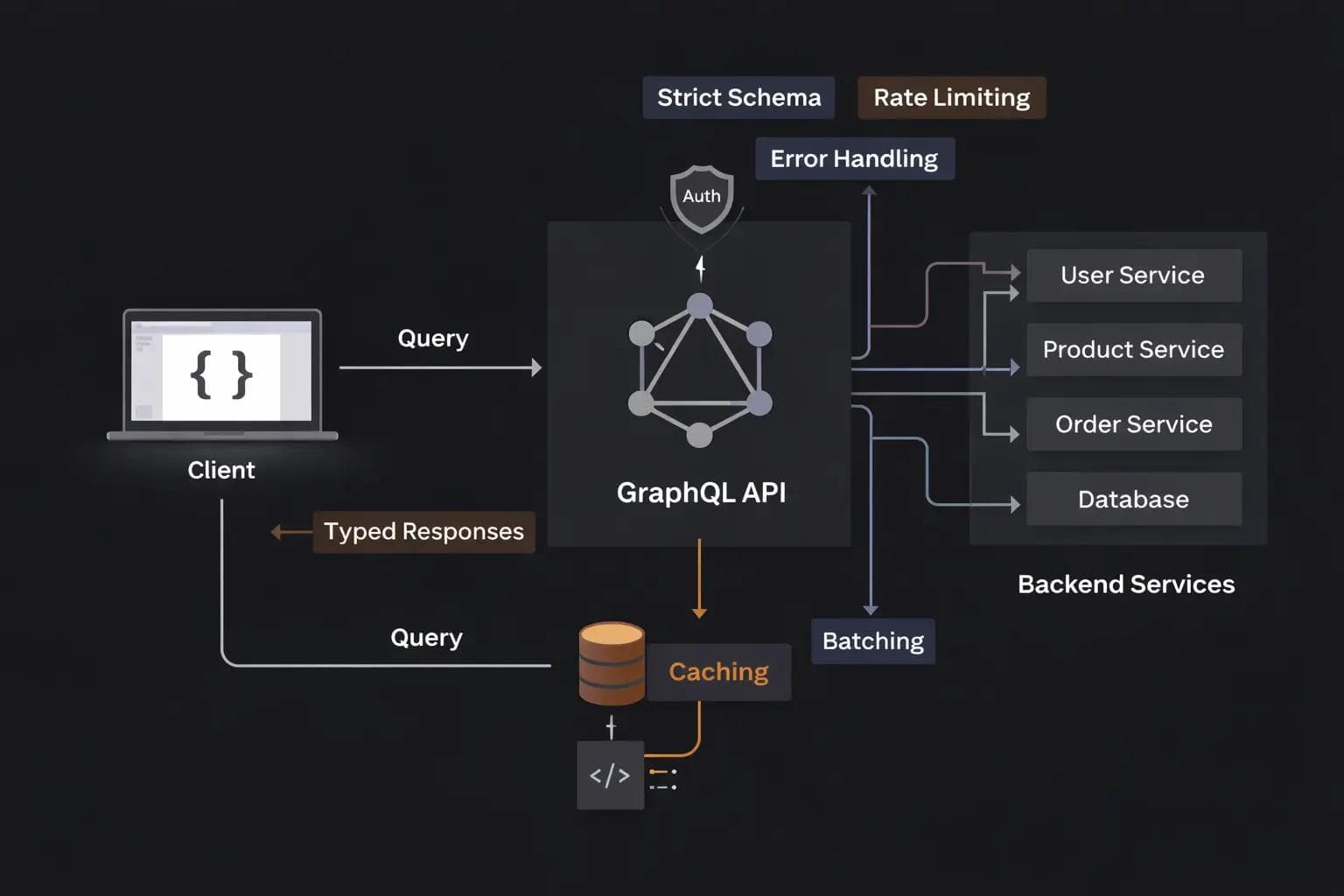
I remember the first time I moved a production project from REST to GraphQL. At first, it felt like magic. I could fetch exactly what I needed in a single request. No more over-fetching data, no more hitting five different endpoints to load a single dashboard page.
But a few months in, the "magic" started to feel like a nightmare. Our schema became a tangled mess. Performance dropped because of recursive queries. We realized that while GraphQL gives the frontend developer a lot of power, it places a massive responsibility on the backend developer.
If you treat a GraphQL API exactly like a REST API, you are going to run into trouble. Over the years, I have seen teams make the same mistakes repeatedly.
In this guide, I want to walk you through the essential GraphQL best practices. We’ll look at how to design a schema that lasts, how to keep your server fast, and how to avoid the security holes that can sink a project.
Why Design Matters More in GraphQL
In a REST API, you can always version your endpoints. If /v1/users doesn't work anymore, you just create /v2/users.
In GraphQL, you generally have a single endpoint and a single, evolving schema. This means every decision you make about naming and structure is harder to change later. You aren't just building an endpoint; you are building a graph of your company's entire data model.
1. Design for the Product, Not the Database
The biggest mistake I see developers make is "database-driven schema design." This is when you look at your SQL tables and create a GraphQL type for every table and a field for every column.
Don't do this. Your GraphQL API should reflect how your frontend uses the data.
The Problem
If your database has a user_profile table and a user_auth_settings table, the frontend shouldn't have to know that. They just want a User object.
The Solution
Flatten your structure. Combine data from different sources into a single, cohesive type. Think about the "screens" in your app. What data does the profile page need? Build your types to support those views.
2. Use Evolution Instead of Versioning
As I mentioned, we don't do v1 or v2 in GraphQL. Instead, we use the @deprecated directive.
When you want to change a field name, don't just delete the old one. Add the new field, and mark the old one as deprecated with a clear message explaining what to use instead.
1type User {
2  id: ID!
3  # Old field we want to remove eventually
4  full_name: String @deprecated(reason: "Use firstName and lastName instead")
5  firstName: String
6  lastName: String
7}
This approach allows frontend teams to migrate at their own pace without breaking the app for everyone.
3. The N+1 Problem and How to Kill It
If you learn only one technical thing about GraphQL, let it be this: The N+1 problem will destroy your database performance.
Imagine you are fetching a list of 10 posts, and for each post, you want the author's name.
- Your server makes 1 query to get the 10 posts.
- For the first post, it makes a query for the author.
- For the second post, it makes another query for the author. ... and so on.
That is 1 + 10 = 11 queries for a very simple request. If you have 100 posts, that’s 101 queries.
The Solution: DataLoader
We solve this using a pattern called "batching and caching," usually implemented via a library called DataLoader.
Instead of hitting the database immediately, DataLoader waits for a single "tick" of the event loop. it gathers all the requested IDs and makes one single SELECT * FROM users WHERE id IN (...) query.
4. Use Input Objects for Mutations
When you are creating or updating data (Mutations), don't pass a long list of individual arguments. It makes the schema hard to read and even harder to update.
The Wrong Way
1mutation createUser(username: String!, email: String!, bio: String, age: Int): UserThe Right Way
Use an Input type. It’s cleaner and allows you to reuse the input structure across different mutations.
1input CreateUserInput {
2  username: String!
3  email: String!
4  bio: String
5  age: Int
6}
7
8mutation createUser(input: CreateUserInput!): User
5. Standardize Your Mutation Responses
In my early GraphQL days, my mutations returned just the object I created. But what if there’s a validation error? Or what if a specific business rule wasn't met?
A best practice I swear by is creating a "Payload" type for every mutation. It should always include:
- The object that was modified (if successful).
- A list of user-friendly errors.
- A success boolean.
1type UpdateUserPayload {
2  user: User
3  success: Boolean!
4  errors: [UserError!]!
5}
6
7type UserError {
8  field: String
9  message: String!
10}
6. Pagination: Don't Return Plain Lists
Never return a raw list of items like [Post]. What happens when you have 100,000 posts? Your server will crash trying to fetch them all at once.
In the GraphQL ecosystem, the standard for pagination is Relay Cursor Connections. Even if you aren't using the Relay framework on the frontend, using this structure makes your API future-proof and compatible with the best tooling.
Why Cursors over Offsets?
Offset pagination (LIMIT 10 OFFSET 20) is slow for large databases and buggy when items are deleted while a user is scrolling. Cursors point to a specific item, making them faster and more stable.
7. Security: Depth and Complexity Limiting
GraphQL is vulnerable to "Denial of Service" (DoS) attacks in a way REST isn't. An attacker can write a recursive query that asks for a user, then their posts, then the authors of those posts (who is the user), then their posts again... indefinitely.
1# A malicious query
2query {
3  user {
4    posts {
5      author {
6        posts {
7          author {
8            # This can go on forever
9          }
10        }
11      }
12    }
13  }
14}
How to Protect Yourself
- Depth Limiting: Set a maximum depth for queries (e.g., no more than 10 levels deep).
- Query Cost Analysis: Assign a "cost" to each field. A simple string might cost 1, while a list of relations might cost 10. Reject any query that exceeds a total cost of 100.
8. Authentication and Authorization
I’ve seen a lot of confusion about where to put security logic.
Authentication (knowing who the user is) should happen before the request even hits your GraphQL resolvers. Usually, this is done in a piece of middleware that checks a JWT or session cookie and adds the user to the "context."
Authorization (knowing what the user can see) should happen inside your business logic layer, not inside the resolvers themselves. Your resolvers should be thin wrappers that call "Service" or "Model" functions.
9. Logging and Monitoring
In REST, you can look at your server logs and see 404 Not Found or 500 Internal Server Error. In GraphQL, almost every request is a 200 OK, even if it contains errors in the response body.
This makes traditional monitoring useless.
You need to use tools specifically designed for GraphQL (like Apollo Studio, Helia, or custom tracing) that can look inside the response and track which resolvers are slow and which fields are failing.
Common Pitfalls to Avoid
- Over-Engineering: Don't build a complex graph for a simple contact form.
- Logging Sensitive Data: Be careful not to log the contents of arguments, as they might contain passwords or personal data.
- Defaulting to Nullable: By default, all fields in GraphQL are nullable. Be explicit about what is required using the ! mark. It makes the frontend developer's life much easier.
FAQ Section
Is GraphQL faster than REST?
Not necessarily. It is faster for the network because it reduces the number of requests, but it can be slower on the server if you don't handle the N+1 problem correctly.
Should I use GraphQL for everything?
No. For simple CRUD applications or public APIs where the data structure is very flat, REST is often simpler and faster to implement.
How do I handle file uploads?
GraphQL doesn't handle multipart requests natively. The common practice is to use a separate "upload" service or to send a mutation that returns a "Pre-signed S3 URL" which the client then uses to upload the file directly to the cloud.
Conclusion: How to Apply This Knowledge
GraphQL is a powerful tool, but it requires a disciplined approach. If you are starting a new project or fixing an old one, here is how I recommend you apply these lessons:
- Audit your resolvers: Are you making multiple database calls for a single list? Implement DataLoader today.
- Review your mutations: Start wrapping your responses in Payload types to handle errors gracefully.
- Secure your endpoint: Implement a query depth limit immediately to prevent basic DoS attacks.
The goal of a great API is to be "predictable." When a frontend developer looks at your schema, they should immediately understand how to get the data they need without having to ask you.
About the Author

Suraj - Writer Dock
Suraj Kumar is a writer, entrepreneur, and the CEO and founder of this website, sharing simple and practical insights on business, creativity, and personal growth. With experience building digital projects, they enjoy helping others learn, grow, and succeed online.


